






Joshua Charles
Members
-
Joined
-
Last visited
-
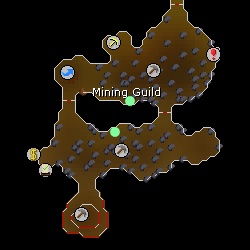
The south node is where it starts, then paths across to the F2P area nodes to the North
-
Yes, just the two rocks in the non-member area. I can manual select the rocks inside the member area and have a smooth cycle I just didnt know if you new this feature was busted due to it not pathing correctly and going to the two rocks in the non member area. This is in the dwarven mines guild area. Thanks for the reply, love the script 100%.
-
Having issue with the member mining guild Adamant selection, The bot doesn't feature adamant in the non member normal mining guild area, but in the advanced area only. When I chose that option is still targets the adamant in the non-members area also causing me to walk into the rock wall between the entrance doors.. Hope this helps, message if more detailed info is needed.

