Jump to content
View in the app

A better way to browse. Learn more.

OSBot :: 2007 OSRS Botting

A full-screen app on your home screen with push notifications, badges and more.

To install this app on iOS and iPadOS
  1. Tap the Share icon in Safari
  2. Scroll the menu and tap Add to Home Screen.
  3. Tap Add in the top-right corner.
To install this app on Android
  1. Tap the 3-dot menu (⋮) in the top-right corner of the browser.
  2. Tap Add to Home screen or Install app.
  3. Confirm by tapping Install.

0verdrive

Members
  • Joined

  • Last visited

  1. 0verdrive replied to Tom's topic in Fishing & Cooking
    Hi Tom, Were you able to look into the bug? i'd like to testrun again of you've fixed it before buying. Regards
  2. 0verdrive replied to Tom's topic in Fishing & Cooking
    You're welcome. Could you let me know when/if you're able to look into this? I'd happily test again. EDIT: It appears the account I was testing with got banned, probably because it had been standing still for longer periods of time because of the bug.
  3. 0verdrive replied to Tom's topic in Fishing & Cooking
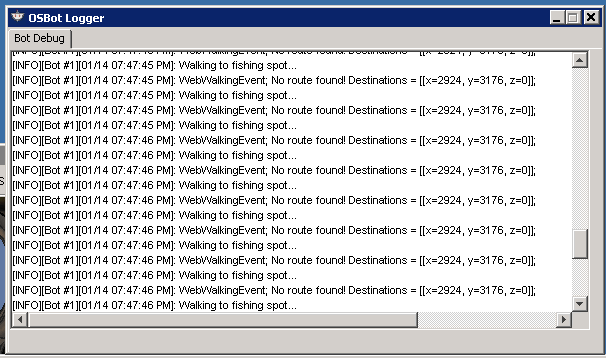
    Thanks for the trial. Ran this bot for a couple of hours. Everything works great, but there seems to be a bug when fishing at Karamja that causes it to freeze near the docks. The bug does not occur every time, but I had it during multiple runs. Screenshot attached, this is a bit of a gamebreaker for me, as I was planning to use it at Karamja. Let me know if I can be of any help for further troubleshooting. config.properties
  4. 0verdrive replied to Tom's topic in Fishing & Cooking
    Could I get a trial please? Looks promising

Account

Navigation

Search

Configure browser push notifications

Chrome (Android)
  1. Tap the lock icon next to the address bar.
  2. Tap Permissions → Notifications.
  3. Adjust your preference.
Chrome (Desktop)
  1. Click the padlock icon in the address bar.
  2. Select Site settings.
  3. Find Notifications and adjust your preference.