zeroter5
Members
-
Joined
-
Last visited
Everything posted by zeroter5
-
I'm saying when I click the start button in the script repository nothing happens, the bot doesn't even put a message into the log, there's just the dialog from the client adding a botting instance. Edit: Normally on most bots start up the bot logs something like "generic bot name has started" , that doesnt happen.
-
I recently made a quick woodcutting script, exported it to my local files and tried to turn the thing on to begin bug testing but when I try to turn the script on the client isnt able to start it and get past the point of putting the start up message in the client logger. Other scripts ive made are able to start up, but for some reason this one just doesnt. Any suggestions on how to fix this?
-
Thanks for the suggestions guys, i tried adding in the label and textfield into a new panel and then adding that new panel to the gui as a whole. So i have the panel that contains the dropdown box/label and then the textfield one. Here's what I end up with private void createGUI(){ final int guiWidth = 350, guiHieght = 150; Dimension screenSize = Toolkit.getDefaultToolkit().getScreenSize(); // Calculating x and y coordinates final int gX = (int) (screenSize.getWidth() / 2) - (guiWidth / 2); final int gY = (int) (screenSize.getHeight() / 2) - (guiHieght / 2); // create a new JFrame with the title "GUI" gui = new JFrame("GUI"); // set the x coordinate, y coordinate, width and height of the GUI gui.setBounds(gX, gY, guiWidth, guiHieght); gui.setResizable(true); // Create a sub container JPanel JPanel panel = new JPanel(); JPanel panel1 = new JPanel(); gui.add(panel); gui.add(panel1); JLabel label = new JLabel("Select a food type:"); // create a label JLabel label1 = new JLabel("Enter Mob Name"); label.setForeground(Color.white); label1.setForeground(Color.white); panel.add(label); // add it to the JPanel panel1.add(label1); // create a select box for food options JComboBox<String> foodSelector = new JComboBox<>(new String[]{"Shrimps", "Trout", "Salmon","Lobster", null}); JTextField mobName = new JTextField(); // add an action listener, to listen for user's selections, assign to a variable called selectedFood on selection. foodSelector.addActionListener(e -> selectedFood = foodSelector.getSelectedItem().toString()); // add the select/text-field box to the JPanel panels panel.add(foodSelector); panel1.add(mobName); JButton startButton = new JButton("Start"); // add an action listener to the button startButton.addActionListener(e -> { // This code is called when the user clicks the button started = true; // Set the boolean variable started to true gui.setVisible(false); // Hide the GUI }); panel.add(startButton); // Add the button to the panel gui.setVisible(true); //makes GUI visible } Here is my code for the GUI, I think my problem may just be the panels are on top of each other but im not sure?
-
Hello Osbot community, I am currently working on a script where you enter a mob name in an J-input dialog window, and select an item to eat from a dropdown(JComboBox) menu and the bot will kill the any nearby mobs with the name you entered and when your character drops below a certain hp mark your character will eat the food. At the current moment I have the script set up such that each of these 2 actions is accomplished in separate jframes/windows. Can anyone point me in the right direction on combining the windows into one? Any help would be much appreciated! i've included pictures of part of my code in these imgur links below (how the 2 windows are displayed when program is run) the createGUI method call creates the jcombobox in this image while Joptionpane is the input box
-
-
I'm currently working on an alching script, i have the majority of the script done I just want to create a gui that has a text box where i can enter an item ID and have the bot alch that item. I know how to create interactible drop down menus (as seen explvs gui tutorial) but I've been having trouble finding up-to-date info on text boxes. Does anyone know of any tutorials i can look at or know how to code the text box?
-
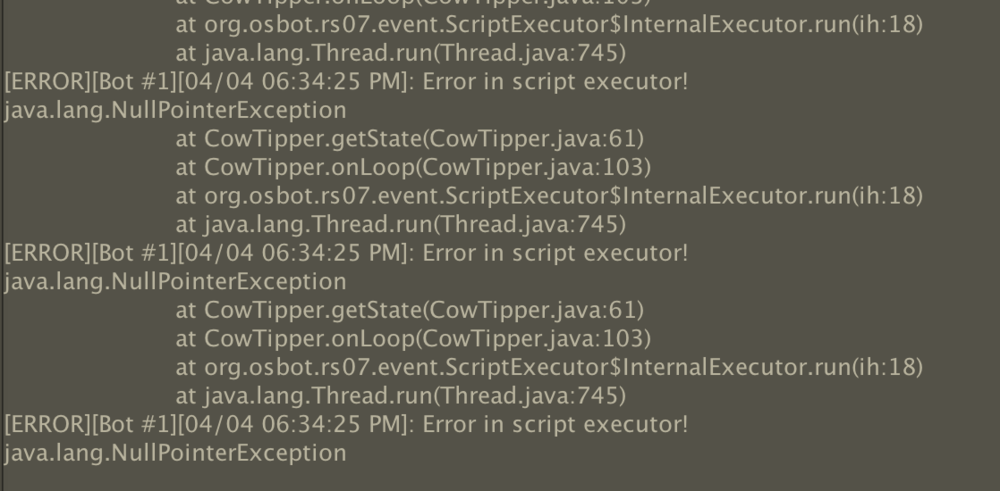
Thank you for the help! I changed my wait condition statement like you suggested i'll add that into the bank state. Line 61 turns out to be my condition statement for attacking, any idea as why that line may be causing me issues? @Apaec Thanks for the reply! My script uses a path with specific corrdinates to walk and clicks on the position again if doesn't reach it in a certain time, do you think it could still get stuck and break? @Juggles
- 5 replies
-
- help
- script
- banking
- development
-
Tagged with:
-
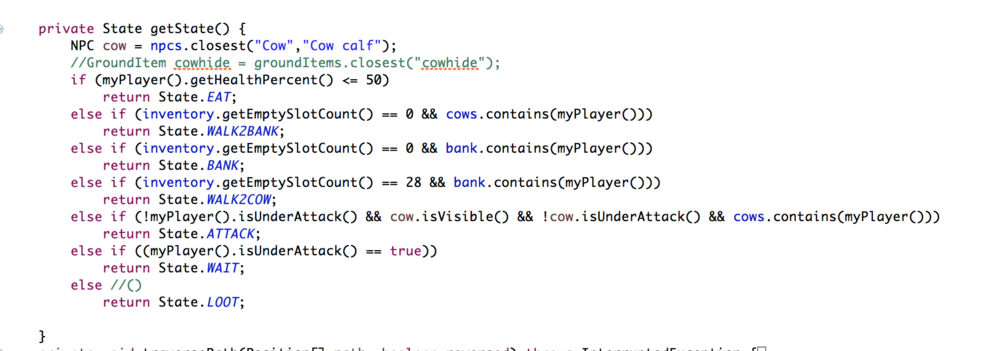
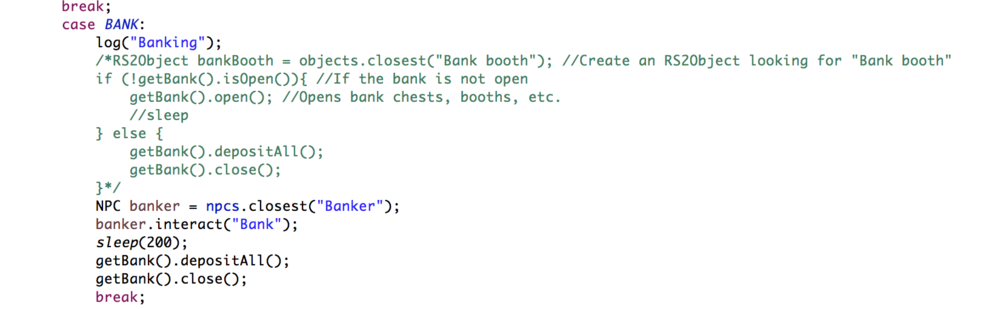
I'm writing my first script that involves banking and as of now the script kills cows, loots the hides and walks to the bank(not as efficiently as it should though, still learning to code) when the inventory is full but is unable to bank. I have screen shots of my error message, my getState method and my bank state. In my bank state i've tried using the commented code and the current uncommented code and haven't had any luck. Can anyone point me in the right direction or is there anyone who knows exactly what that error means?
- 5 replies
-
- help
- script
- banking
- development
-
Tagged with:
-
I tried implementing this class and these methods but getLocalWalk() and walkPath are undefined for more, what do I need to import in order to fix that?
-
Thanks guys I used the windows scaling feature, my only dislike with that solution is it scales everything else on the desktop as well making webpages a bit weird. Is there a way to target a specific app with the scaling and leave the rest alone or is it an all or nothing kind of deal?
-
I can't seem to change the size of my client and it's incredibly small on my desktop. Has anyone else had similar issues and or luck fixing it?
-
-
I have just started creating some very basic scripts, at first I was able to export them into my Osbot scripts folder, they'd show up in client and i could run them. Then somehow something broke and now only the local Woodcutter V- 0.1 shows even though I have 3 scripts in my script folder. Also if I remove the script that has the code for the Woodcutter it still stays in the Script Selector. So for example there will be GoblinKiller and Script1 in the Script folder and the Woodcutter will still show(it's named Script Update Tester in the folder in the screenshot) but it won't be runable. I've tried redownloading osbot, removing the osbot.jar build path and re-adding it but no luck. Has anyone had any similar issues? image of my situation -