Skip to content
View in the app

A better way to browse. Learn more.

OSBot :: 2007 OSRS Botting

A full-screen app on your home screen with push notifications, badges and more.

To install this app on iOS and iPadOS
  1. Tap the Share icon in Safari
  2. Scroll the menu and tap Add to Home Screen.
  3. Tap Add in the top-right corner.
To install this app on Android
  1. Tap the 3-dot menu (⋮) in the top-right corner of the browser.
  2. Tap Add to Home screen or Install app.
  3. Confirm by tapping Install.

emelie

Trade With Caution
  • Joined

  • Last visited

Everything posted by emelie

  1. emelie replied to emelie's topic in Accounts
    highest bid so far.
  2. emelie replied to emelie's topic in Accounts
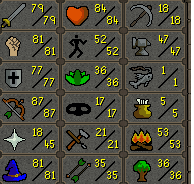
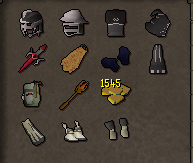
    selling it for 50m if you're intressted. bought for 50m and i got a few range lvls.
  3. emelie replied to emelie's topic in Accounts
    bump
  4. emelie replied to emelie's topic in Accounts
    bump
  5. emelie posted a topic in Accounts
    Sold
  6. emelie replied to emelie's topic in Accounts
    bump
  7. emelie replied to emelie's topic in Accounts
    Bump
  8. emelie replied to emelie's topic in Accounts
    .
  9. emelie replied to emelie's topic in Accounts
    bump
  10. emelie replied to emelie's topic in Accounts
    bump. changed price to 80m or 85$
  11. emelie replied to emelie's topic in Accounts
    bump
  12. i can do the quest for 2m
  13. emelie replied to emelie's topic in Accounts
    Highest bid so far.
  14. emelie replied to emelie's topic in Accounts
    No, i didn't.
  15. emelie replied to emelie's topic in Accounts
    You can make loads of cash just by doing zulrah with it.
  16. emelie replied to emelie's topic in Accounts
    someone bid 80m already. current highest i would let it go at 90m. the acc worth more than that but in need of money atm
  17. emelie replied to emelie's topic in Accounts
    bump
  18. gratz @Eagle Scripts
  19. Offer? regicide done
  20. already bought
  21. emelie replied to emelie's topic in Accounts
    .
  22. emelie replied to emelie's topic in Accounts
    .

Account

Navigation

Search

Search

Configure browser push notifications

Chrome (Android)
  1. Tap the lock icon next to the address bar.
  2. Tap Permissions → Notifications.
  3. Adjust your preference.
Chrome (Desktop)
  1. Click the padlock icon in the address bar.
  2. Select Site settings.
  3. Find Notifications and adjust your preference.