




Jump to content
View in the app

A better way to browse. Learn more.

OSBot :: 2007 OSRS Botting

A full-screen app on your home screen with push notifications, badges and more.

To install this app on iOS and iPadOS
  1. Tap the Share icon in Safari
  2. Scroll the menu and tap Add to Home Screen.
  3. Tap Add in the top-right corner.
To install this app on Android
  1. Tap the 3-dot menu (⋮) in the top-right corner of the browser.
  2. Tap Add to Home screen or Install app.
  3. Confirm by tapping Install.

elloco27

Members
  • Joined

  • Last visited

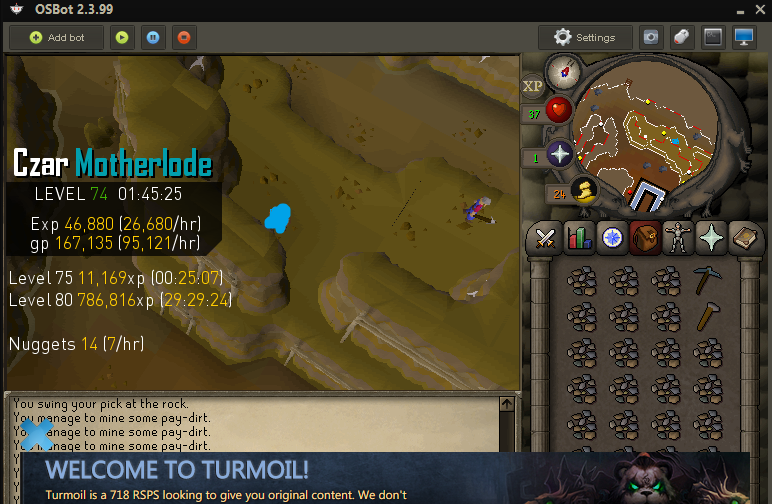
  1. hey sorry to bother again, but the problem from yesterday occured again, the bot gets stuck every once in a while upstairs after the inventory is full. i have to move it and break the rock and take him close to ladder for the bot to resume.
  2. hey the bot seems to get stuck upstairs. especially in these places (blue). it would just say full inventory and he will not move. i have to physically move him and break the rock, and when i take him near the ladder, that is when the bot reacts again and starts moving. help plz. thanks alot it seems to happen on the other side upstairs too. just got stuck on other side
Account

Navigation

Search

Configure browser push notifications

Chrome (Android)
  1. Tap the lock icon next to the address bar.
  2. Tap Permissions → Notifications.
  3. Adjust your preference.
Chrome (Desktop)
  1. Click the padlock icon in the address bar.
  2. Select Site settings.
  3. Find Notifications and adjust your preference.
