Flexeren
Members
-
Joined
-
Last visited
-
I may have a solution, but I need some help making it reality. My idea: First time the case is running: - find the nearest fishing spot - get and save the position of said fishing spot - start fishing Everytime the case is running, except first time: - find all nearby fishing spots - check if one of the fishing spot's positions equals the one already fishing at I think I can figure out the rest, but that part I can't seem to figure out.
-
I tried that earlier, but that creates another problem. When the fishing spot disappears, the character is still "fishing" in empty water for a couple of seconds, which still counts as "isAnimating". How do I fix that then?
-
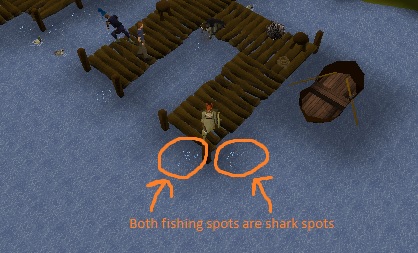
Hi, I have a script, which generally works. Except when this happens: This is the code I use: case FISHING: NPC fishingSpot = npcs.closest(true, 1511); camera.toTop(); camera.moveYaw(0); if (!myPlayer().isInteracting(fishingSpot)) { if (fishingArea.contains(fishingSpot) && fishingArea.contains(myPlayer())) { log("Fishing at area 1"); fishingSpot.interact("Harpoon"); sleep(random(3000)); } else if (fishingArea.contains(fishingSpot) && !fishingArea.contains(myPlayer())) { log("Area 1 is suitable, but not in reach. Walking there now"); getWalking().walk(fishingArea); } } if (myPlayer().isInteracting(fishingSpot)) { // Do things while waiting } break; The problem is, it finds one of the spots, starts fishing, waits, then searches again, finding the other spot, and then interacting with that instead. So it is just looping, clicking at each spot every 3 seconds (the sleep timer). How can I improve it? Any help/advice is highly appreciated!
-
Thanks for the quick replies, this is surely a big help to me, thanks! I will mess around with it
-
Hey there, I was wondering if it was possible to move the mouse while doing a task and waiting for it to complete. Fx while Woodcutting, it hovers the mouse on the next nearby tree, while chopping another one. Any help / tips appreciated!