skatebourddd
Members
-
Joined
-
Last visited
-
why is that?
-
Is there any tips you could give me on programming bots? I do have some basic java knowledge and I am just trying to make simple scripts until learning how to do it efficiently.
-
That worked thanks lol that was an easy fix!
-
I have not, let me try that!
-
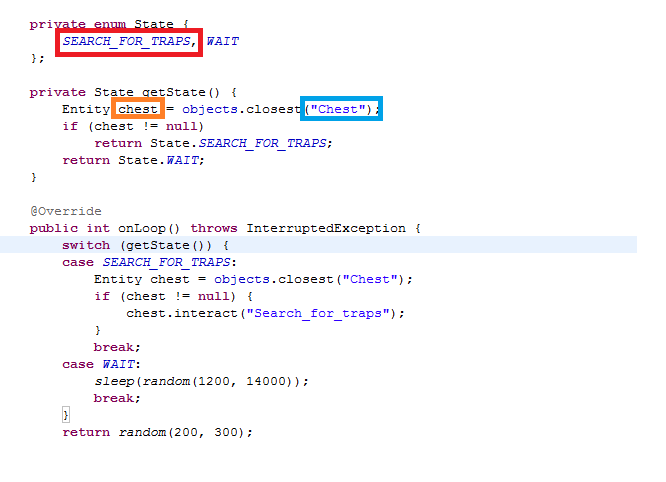
No i dont want to be spoonfed but i have been trying trial and error on how to make it right click search for traps at the ardounge nature rune chest, not sure if i need to make it entity chest or entity stall = objects.closest("chest"); also on my state would it be SEARCH_FOR_TRAPS or is their a different way to do that? This is my first script and I am just trying to learn and this seems like an extremely easy script to start with! Any help or guidance would be appreciated thanks!
-
Is a script for 30 days or permanently if purchased?
-
I am trying out the script, it is very good. I have one question does it blackjack? You have to refresh your scripts on the bot client after they say you are good. Unfortunately it will only stay on their for 24 hours so you may need to try to get another!
-
-
I would like to try a free trial please!