Mage
Trade With Caution
-
Joined
-
Last visited
Everything posted by Mage
-
-
wot
-
-
Account is sold to http://osbot.org/forum/user/29891-elliotcole/
-
BUT , i will accept 8m, for the a/w price as of now, and i want to get rid of it and stop playing rs for a bit
-
What ? Why wouldn't you? Just don't suicide it overnight everyday 24/7 ? And you will be fine "LMFAO"
-
Yes but getting this high without ban is unlikely also 3.5 for membership alone id sell for 10m understandable though any offers welcome
-
-
-
-
-
-
-
Account is sold to Scorpioz
-
most likely not
-
2.5/M is the price id like to sell for pm me if any questions
-
Not sure what the current gold rate is , but taking offers at the moment any questions pm me
-
-
-
thanks top offer
-
Also has torso + a rune defender
-
Also has torso and rune defender x2
-
I know that, but the first one was posted in the services thread by accident.
-
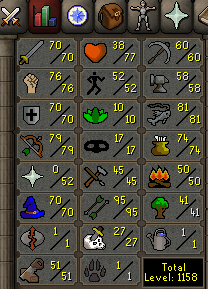
Has no bans at all 54 quest points animal mag , lost city, MM done, havn't had time to do RFD pre reqs, or the actual quests, but i got almost all the pre req skills done A/W: 15m Starting bid: 8m i think it has around 8 days of membership left. any questions please pm me
-
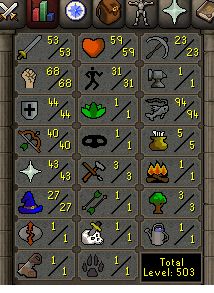
No bans at all, level 94 fishing has some combat levels done, and quests done so you don't look like a level 3 bot. has 28 days of membership left A/W price :15m Starter bid: 8m any questions please PM me