Jump to content
View in the app

A better way to browse. Learn more.

OSBot :: 2007 OSRS Botting

A full-screen app on your home screen with push notifications, badges and more.

To install this app on iOS and iPadOS
  1. Tap the Share icon in Safari
  2. Scroll the menu and tap Add to Home Screen.
  3. Tap Add in the top-right corner.
To install this app on Android
  1. Tap the 3-dot menu (⋮) in the top-right corner of the browser.
  2. Tap Add to Home screen or Install app.
  3. Confirm by tapping Install.

Unotihs

Members
  • Joined

  • Last visited

  1. Sorry Apaec. I have been Mining at present as it used all the Coal haha. I will leave a comment now when I work out how to. Also I noticed when I am making Mith plates or anything really, that it stands outside the anvils in Varrock and does nothing. I will try get a screenshot to show where it stands and what it does exactly. Appreciate your work!!! EDIT: I can't even find where to leave a Review...
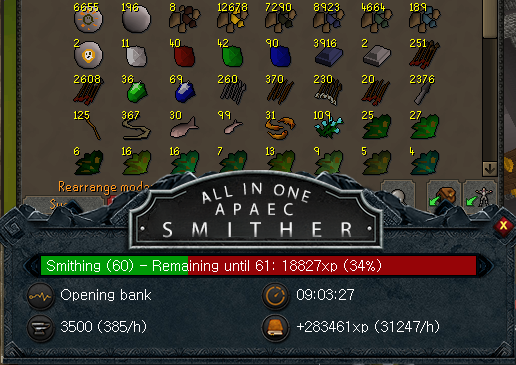
  2. Ran Flawless for 9 hours from what i can see .
Account

Navigation

Search

Configure browser push notifications

Chrome (Android)
  1. Tap the lock icon next to the address bar.
  2. Tap Permissions → Notifications.
  3. Adjust your preference.
Chrome (Desktop)
  1. Click the padlock icon in the address bar.
  2. Select Site settings.
  3. Find Notifications and adjust your preference.