Jump to content
View in the app

A better way to browse. Learn more.

OSBot :: 2007 OSRS Botting

A full-screen app on your home screen with push notifications, badges and more.

To install this app on iOS and iPadOS
  1. Tap the Share icon in Safari
  2. Scroll the menu and tap Add to Home Screen.
  3. Tap Add in the top-right corner.
To install this app on Android
  1. Tap the 3-dot menu (⋮) in the top-right corner of the browser.
  2. Tap Add to Home screen or Install app.
  3. Confirm by tapping Install.

1ds2ds3ds

Members
  • Joined

  • Last visited

Everything posted by 1ds2ds3ds

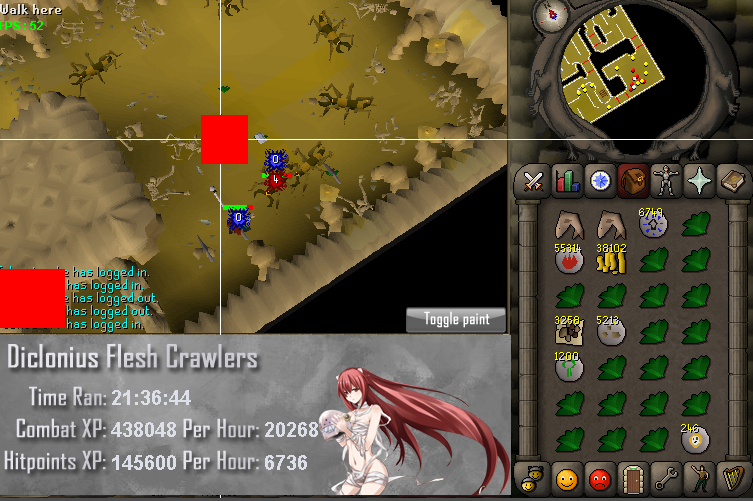
  1. One problem I have been having is the script traps itself in the west door of flesh crawlers. The bot then remains running for hours standing in one spot. Maybe update the script to reopen the door to get back into the room? Also my defence level is high enough not to eat at all. Perhaps add a option to eat food to pick loot up. Would love to get a lot more herbs instead of stack-able runes/ores/money. Overall a great script. One of my top 3!
  2. I've been running this script while I am at work for 12 hours. The bot has been doing a good job while I am gone. Glad to see a script that knows how to run for more then 1 hour with out screwing up or causing me to die.

Account

Navigation

Search

Configure browser push notifications

Chrome (Android)
  1. Tap the lock icon next to the address bar.
  2. Tap Permissions → Notifications.
  3. Adjust your preference.
Chrome (Desktop)
  1. Click the padlock icon in the address bar.
  2. Select Site settings.
  3. Find Notifications and adjust your preference.