





All Activity
- Past hour
-
 1. Pictures of the account stats Assume all hidden stats over 65, but no over 80 2. Pictures of the total wealth (if there is any) Inferno Cape, Ava Assembler, Avernic Defender, Skotizo Pet, and random items. Please inquire and I can let you know. No actual wealth on the account besides that. 3. Pictures of the quests completed Quests are all done except the new ones with Sailing. Quest cape was taken away with sailing release. 9. Original/previous owners AND Original Email Address I am the original owner, I made the account over 20 years ago during Runescape Classic. No one else has ever had any details other than a current password on the account. Legacy Account, login is a username, not an email or jagex launcher. I am accepting OSRS GP or Crypto ONLY.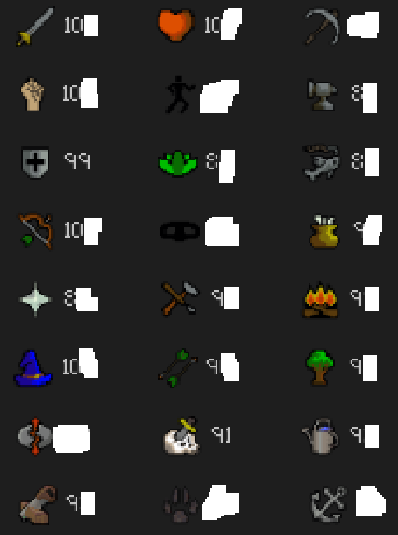
-
 Online @ https://discord.gg/mPnKPKTZ99
 -
Online @ https://discord.gg/mPnKPKTZ99
-
Online @ https://discord.gg/mPnKPKTZ99
-
Online @ https://discord.gg/mPnKPKTZ99
-
Online @ https://discord.gg/mPnKPKTZ99
-
Online @ https://discord.gg/mPnKPKTZ99
-

- Today
-
-
 LokeTheViking joined the community
 -
-

-
check us out @ https://probemas.com/
-
-
check us out @ https://probemas.com/
-
check us out @ https://probemas.com/
-
 Online @ www.PartyPeteShop.com
 - Yesterday
-
Online!
-
Online @ www.PartyPeteShop.com
-
Online @ www.PartyPeteShop.com
-
Hootku joined the community
-
Lummi joined the community
-
Online @ https://discord.gg/mPnKPKTZ99
-
Online @ https://discord.gg/mPnKPKTZ99
-
Online @ https://discord.gg/mPnKPKTZ99
-
Online @ https://discord.gg/mPnKPKTZ99
-
Online @ https://discord.gg/mPnKPKTZ99
-
Online @ https://discord.gg/mPnKPKTZ99

