




Jump to content
View in the app

A better way to browse. Learn more.

OSBot :: 2007 OSRS Botting

A full-screen app on your home screen with push notifications, badges and more.

To install this app on iOS and iPadOS
  1. Tap the Share icon in Safari
  2. Scroll the menu and tap Add to Home Screen.
  3. Tap Add in the top-right corner.
To install this app on Android
  1. Tap the 3-dot menu (⋮) in the top-right corner of the browser.
  2. Tap Add to Home screen or Install app.
  3. Confirm by tapping Install.

haaginator

Members
  • Joined

  • Last visited

  1. haaginator replied to haaginator's topic in Archive
    AH YES THANK YOU SO SO MUCH. I DIDN'T KNOW THERE WAS A NEW VERSION OF THE CLIENT. YOU'RE MY HERO.
  2. haaginator replied to haaginator's topic in Archive
    it still isn't baking sadly. I'll just wait for an updated version. Thanks much! A new issue im having along with the old not banking problem. I tried to run it a few minutes ago and now it doesn't even start up and the entire client freezes. i really hope this script is fixed soon because i would love to use it.
  3. haaginator replied to haaginator's topic in Archive
    i have stopped it before and still nothing. i'm going to try shutting the bot completely down and try it then. if still nothing i will contact the guy. Thanks much for the quick response!
  4. haaginator posted a topic in Archive
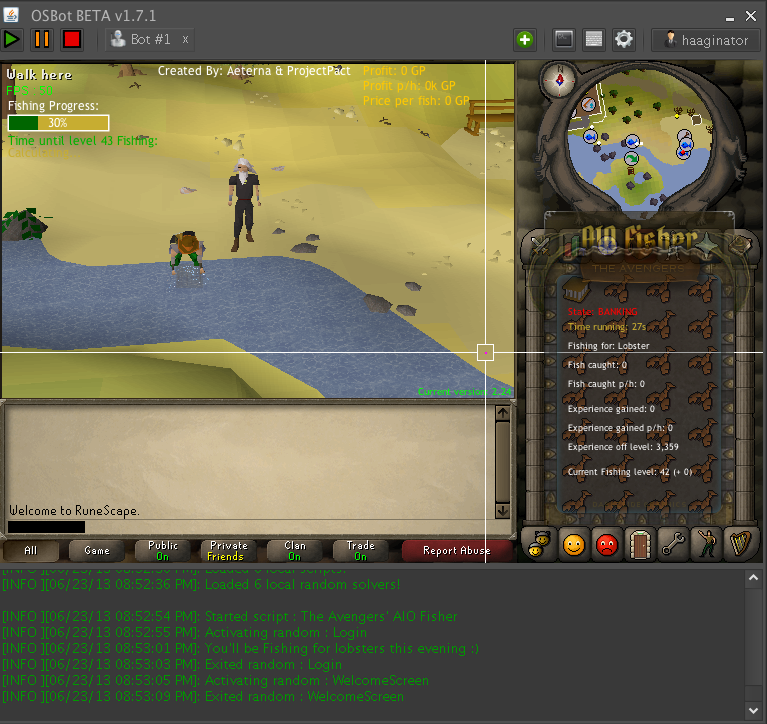
    The bot works up until it's time to bank the fish. It will get a full inv of lobs and then just stand there. What can i do?
Account

Navigation

Search

Configure browser push notifications

Chrome (Android)
  1. Tap the lock icon next to the address bar.
  2. Tap Permissions → Notifications.
  3. Adjust your preference.
Chrome (Desktop)
  1. Click the padlock icon in the address bar.
  2. Select Site settings.
  3. Find Notifications and adjust your preference.