DiscipleSuburbia
Members
-
Joined
-
Last visited
Everything posted by DiscipleSuburbia
-
Would it be possible to get fresh lvl 3s without membership? I have the card codes and just need fresh accounts on fresh ips. Would be willing to work something out.
-
I can't do that; wont get to the downloading client page
-
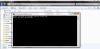
Ive tried to redownload and I've ran the same batch file on a Advertising other bots isn't allowed. file. It doesn't want to work and keeps saying that the .jar file is invalid or corrupt. Anyone got a fix?
-
Bought 2 accs lvl 3 for 7m ea, good service and quick trade time. Went first and was instant; great service! tyvm
-
Im setting up the osbot client on another laptop and it will not allow me to log into my osbot account with the client on this laptop. I transfered the client through onedrive from one laptop to another so I would have the same version and everything and it downloaded and would run the same with a batch file but I I now get the messages; 'attempting to connect to remote server' and 'connected to remote server' while I'm trying to login. Any suggestions? Or is this laptop shit + bad internet just too slow for osbot servers?
-
Wouldn't mind a sig and avatar, if you wouldn't mind? For the sig just make it as 'volatile' as possible and the avatar just a pure specing dds to gmaul or a pure in general. -Not sure how the avatar works entirely, but a sig for sure would be appreciated