




Jump to content
View in the app

A better way to browse. Learn more.

OSBot :: 2007 OSRS Botting

A full-screen app on your home screen with push notifications, badges and more.

To install this app on iOS and iPadOS
  1. Tap the Share icon in Safari
  2. Scroll the menu and tap Add to Home Screen.
  3. Tap Add in the top-right corner.
To install this app on Android
  1. Tap the 3-dot menu (⋮) in the top-right corner of the browser.
  2. Tap Add to Home screen or Install app.
  3. Confirm by tapping Install.

gravityice

Members
  • Joined

  • Last visited

Everything posted by gravityice

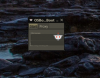
  1. I've now downloaded the latest OSbot Download and it opens the .jar and even runs, but when the client opens, it doesn't open in a usable window. Its a small window that only has entry spots for username and password, which it lets me input, but when i hit enter, it performs no action. It doesn't let me maximize and dragging the window to the top or side of my screen doesnt do anything. I've tried windows+up arrow and nothing. Is there an older version i can download? Specs: Asus zenbook pro 15.6" laptop Windows 10 Java 8 Update 91 Any suggestions are appreciated. how it looks:
  2. qnatures got me banned for a day. gffreescript -.-

Account

Navigation

Search

Configure browser push notifications

Chrome (Android)
  1. Tap the lock icon next to the address bar.
  2. Tap Permissions → Notifications.
  3. Adjust your preference.
Chrome (Desktop)
  1. Click the padlock icon in the address bar.
  2. Select Site settings.
  3. Find Notifications and adjust your preference.