






urka
Members
-
Joined
-
Last visited
Everything posted by urka
-
says version 1.8.0_361, that helpful?xd
-
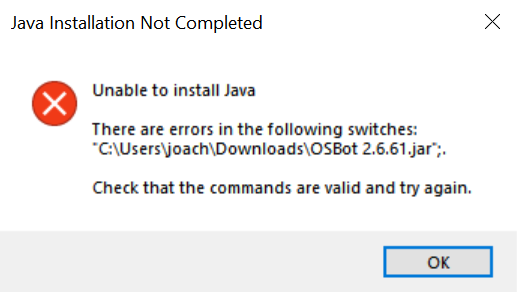
Im getting this message when trying to launch OSbot. Tried re-installing both OSbot and JAVA, restarted computer also. Any idea on how to fix this?
-
lool cute
-
but cant that be fixed...? pures wanna bot too
-
is there another option for a pure script then?
-
but what should i do then... im not going to get def just because of that gate lol... has it been like this from the beginning of the script?
-
yeah, its like when a evil chicken or something comes and attacks you, The bot could just run away a bit like it does when the crabs isnt attacking you anymore but instead it tries to open the fking gate that i dont have access to lol... this needs to be fixed
-
Sup im just wondering if anyone else got the same problem with the gmc exterminate crab script. When the random event "run away from combat" comes up it just tries to open the gate at relleka where you can mine some ores, not sure which ores lol. it says you have to be a fremenik to open the gate, im assuming you have to have completet frenemik trials, but im a 1 def pure and cant do that... Does anyone why this is? could anyone help me please? would be thankful for answers
-
same for me, not working... hope it will be fixed soon


