pooki123
Members
-
Joined
-
Last visited
-
thanks!
-
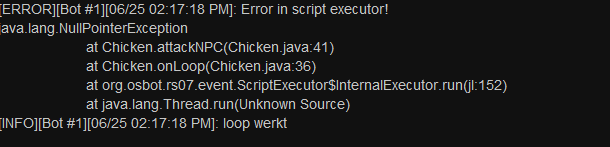
I am making a Chickenkiller script for educational purpose. it was running okay until i got the error in the screenshot: I just dont see what im doing wrong. on google i found the following: "The NullPointerException (NPE) typically occurs when you declare a variable but did not create an object and assign it to the variable before trying to use the contents of the variable. So you have a reference to something that does not actually exist." i dont understand what it means can sombody help? The code i was using: import org.osbot.rs07.api.model.NPC; import org.osbot.rs07.script.Script; import org.osbot.rs07.script.ScriptManifest; import java.awt.*; @ScriptManifest(name = "Chickenkiller", author = "Snatsbats", version = 1.0, info = "", logo = "") public class Chickenkiller extends Script { @Override public void onStart() { log("Let's get started"); } @Override public int onLoop() throws InterruptedException { log("loop works"); NPC npcName = getNpcs().closest(npc -> npc.getName().startsWith("Chicken")); // Area lumbChicken = new Area( // new int[][]{ // { 3225, 3301 }, // { 3225, 3301 }, // { 3237, 3301 }, // { 3237, 3301 }, // { 3237, 3293 }, // { 3237, 3293 }, // { 3225, 3293 }, // { 3225, 3293 } // } // ); // WebWalkEvent webEvent = new WebWalkEvent(lumbChicken); attackNPC(npcName); return 750; //The amount of time in milliseconds before the loop starts over } public void attackNPC(NPC enemyName){ if(enemyName.isAttackable() && myPlayer().getInteracting() == null){ enemyName.interact("Attack"); } } @Override public void onExit() { //Code here will execute after the script ends } @Override public void onPaint(Graphics2D g) { //This is where you will put your code for paint(s) } }