






BlickFastly
Members
-
Joined
-
Last visited
Everything posted by BlickFastly
-
Never used the botting client all within the regular launcher Never used the botting client all within the regular launcher Never used the launcher. only had it downloaded.
-
Maybe due to my anniepro 2 65%? It doesnt have arrow keys and I tried using them and it would only move like a few degrees, because its a built in macro into the keyboards software? Would macroing be part of nord vpn? also how would I avoid being banned with nord?
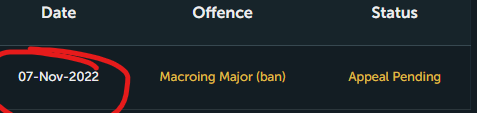
-
Yo, so I just got osbot downloaded then installed osrs. I then manually leveled my osrs account through tutorial island. I then started killing goblins with no scripts. I died in a fresh start world, and then got kicked off the game. Using Nordvpn app is all I can think of that or it recognized the osbot file. Never used any scripts. Anythoughts as to why?



