




Jump to content
View in the app

A better way to browse. Learn more.

OSBot :: 2007 OSRS Botting

A full-screen app on your home screen with push notifications, badges and more.

To install this app on iOS and iPadOS
  1. Tap the Share icon in Safari
  2. Scroll the menu and tap Add to Home Screen.
  3. Tap Add in the top-right corner.
To install this app on Android
  1. Tap the 3-dot menu (⋮) in the top-right corner of the browser.
  2. Tap Add to Home screen or Install app.
  3. Confirm by tapping Install.

someguysomewhere

Members
  • Joined

  • Last visited

Everything posted by someguysomewhere

  1. What if it's still not working? 😅
  2. Thanks, I figured it was something super obvious
  3. No sir, I should've mentioned that. Stealth
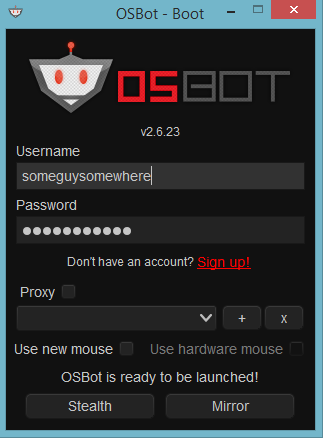
  4. Hey, newpleb here. I just downloaded the OSBot client. I made sure to download and confirm I have java 8 installed. So far so good, so I get to the OSBot client login screen (screenshot below). I put in my info, installed webwalking, then... Nothing. My client closes, and nothing else. I saw the video tutorials, followed everything. Why am I not being taken to the OSRS login page? Any help for a dumbass boomer like me would be very appreciated. Thanks all EDIT: I'm clicking Stealth Injection, not Mirror Mode
Account

Navigation

Search

Configure browser push notifications

Chrome (Android)
  1. Tap the lock icon next to the address bar.
  2. Tap Permissions → Notifications.
  3. Adjust your preference.
Chrome (Desktop)
  1. Click the padlock icon in the address bar.
  2. Select Site settings.
  3. Find Notifications and adjust your preference.