




Jump to content
View in the app

A better way to browse. Learn more.

OSBot :: 2007 OSRS Botting

A full-screen app on your home screen with push notifications, badges and more.

To install this app on iOS and iPadOS
  1. Tap the Share icon in Safari
  2. Scroll the menu and tap Add to Home Screen.
  3. Tap Add in the top-right corner.
To install this app on Android
  1. Tap the 3-dot menu (⋮) in the top-right corner of the browser.
  2. Tap Add to Home screen or Install app.
  3. Confirm by tapping Install.

Octopus

Members
  • Joined

  • Last visited

Everything posted by Octopus

  1. Sometimes this happens as soon as i start the script inside the arena, sometimes it happens after a few minutes, sometimes after an hour. Here is a screenshot of what it looks like. It always clicks in the same area of the screen. It doesn't click towards a specific tile, but on a specific area of pixels in the window. Another thing i found is that sometimes it stops using overloads. I don't know if this is because I'm using range, but the bot will stop using overloads sometimes.
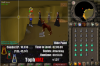
  2. I'm having a problem. After a while, it starts clicking in a single area outside of the arena.
  3. Hey, do you think you could add a safe path for low levels? There's a Nature Running script out there with a safe path, but its only for running nats instead of actually crafting them Please please pleaseeee THANKS!!!
Account

Navigation

Search

Configure browser push notifications

Chrome (Android)
  1. Tap the lock icon next to the address bar.
  2. Tap Permissions → Notifications.
  3. Adjust your preference.
Chrome (Desktop)
  1. Click the padlock icon in the address bar.
  2. Select Site settings.
  3. Find Notifications and adjust your preference.