






Xiwi
Members
-
Joined
-
Last visited
-
-
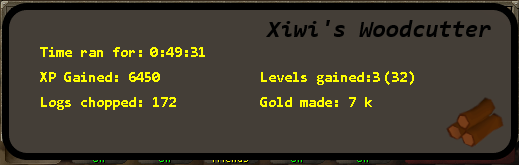
Hello! I just got into botting and I decided to make my first script. It's a simple woodcutting script, that cuts oaks at the back of the lumbridge castle and banks them in the upstairs bank. It has a simple paint with how much xp you have gained, how many levels gained, how many logs you have chopped and how much gold you have made. If you want to chop something else you can change the cutting area, banking area and what kind of tree to chop in the code. How to use: Equip your axe. Start near lumbridge castle. Press play and it starts chopping! Paint and small proggy I decided to post this script for everyone, so that if there's anyone who might want to get into making scripts, they can look at what I have done and copy some of that. Because this was my first script i'm open to feedback! Please point out if I should have made something differently. Codes .jar download link. Place this into your OSbot script folder: C:\Users\yourprofilename\OSBot\Scripts Sorry about this long code line. Didn't know to to make it hide. Code:
-
Can someone give me the .jar file because I cant get it to work myself?

