Archer2170
Members
-
Joined
-
Last visited
Everything posted by Archer2170
-
So my computer was getting abit slow so i decided to reformat it to get rid of all the random games and crap i have and now the bot is no longer having UI issues
-
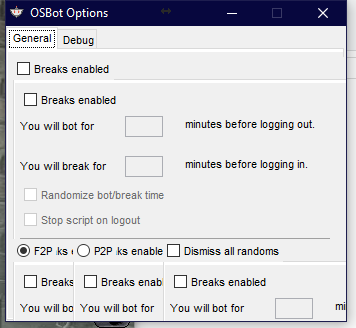
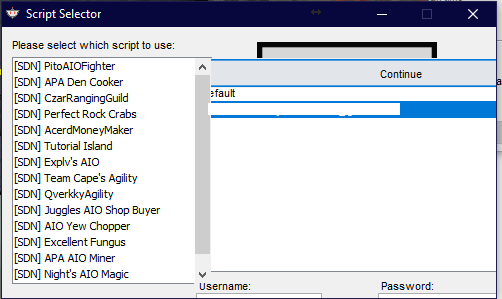
1. OSBot Version (do NOT put "current version", be specific) 2.5.2 2. A description of the issue. Include relevant logs. Ui is doubling up whenever i hover over a check box or text box (find first image attached) also sometimes will double up with the image of another window that was opened before that window (2nd image attached (white bar in middle of blue is username cut out)) 3. Are you receiving any errors in the client canvas or the logger? None 4. How can you replicate the issue? Whenever i hover over a text box or check box it also happens when i hover over the tabs ontop of the settings window that say general, debug 5. Has this issue persisted through multiple versions? If so, how far back? unknown