






alkku15
Members
-
Joined
-
Last visited
Everything posted by alkku15
-
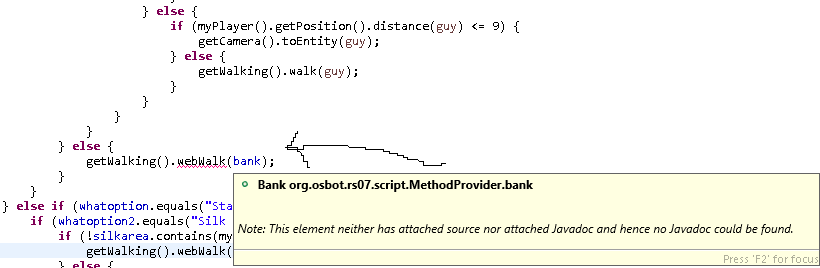
why doesnt this work? getWalking().webWalk(bank); its not recognizing the "bank" from WebBank enum?
-
@Apaec lol got it working this way but this is really bad code L0L JComboBox<String> comboBox_1 = new JComboBox<String>(showoptionsforPickpocket); comboBox_1.setBounds(10, 78, 164, 20); ScriptName.add(comboBox_1); JComboBox<String> comboBox_2 = new JComboBox<String>(showoptionsforStalls); comboBox_2.setBounds(10, 78, 164, 20); ScriptName.add(comboBox_2); JComboBox<String> comboBox_3 = new JComboBox<String>(showoptionsforChest); comboBox_3.setBounds(10, 78, 164, 20); ScriptName.add(comboBox_3); comboBox.addItemListener(new ItemListener() { public void itemStateChanged(ItemEvent arg0) { if (comboBox.getSelectedItem().equals("Pickpocket")) { comboBox_1.setVisible(true); comboBox_2.setVisible(false); comboBox_3.setVisible(false); } else if (comboBox.getSelectedItem().equals("Stalls")) { comboBox_1.setVisible(false); comboBox_2.setVisible(true); comboBox_3.setVisible(false); } else if (comboBox.getSelectedItem().equals("Chests")) { comboBox_1.setVisible(false); comboBox_2.setVisible(false); comboBox_3.setVisible(true); } } });
-
@Apaec ty ill look into it rn but heres the whole gui code + ty for the fast reply lol public void JFrame() { JFrame ScriptName; ScriptName = new JFrame(); ScriptName.setTitle("Thiever"); ScriptName.setBounds(100, 100, 200, 230); ScriptName.getContentPane(); ScriptName.setLayout(null); ScriptName.setResizable(false); //LABEL AKA TITLE JLabel lblWhatToThiev = new JLabel("What to thiev?"); lblWhatToThiev.setBounds(54, 1, 78, 14); ScriptName.add(lblWhatToThiev); //COMBOBOX JComboBox<String> comboBox = new JComboBox<String>(new String[] { "None", "Pickpocket", "Stalls", "Chests"}); comboBox.setBounds(10, 22, 164, 20); ScriptName.add(comboBox); //LABEL AKA TITLE JLabel lblOptions = new JLabel("Option"); lblOptions.setHorizontalAlignment(SwingConstants.CENTER); lblOptions.setBounds(54, 53, 78, 14); ScriptName.add(lblOptions); //COMBOBOX //CHECKBOX JCheckBox chckbxNewCheckBox = new JCheckBox("Eat food?"); chckbxNewCheckBox.setBounds(10, 108, 164, 23); ScriptName.add(chckbxNewCheckBox); //START BUTTON JButton btnNewButton = new JButton("START"); btnNewButton.setBounds(10, 158, 164, 23); ScriptName.add(btnNewButton); btnNewButton.addActionListener(new ActionListener() { //this actionlistener checks if start button is pressed public void actionPerformed(ActionEvent e) { //and then sets the visibility of the gui to false (closes gui) ScriptName.setVisible(false); //disappear when clicking on the button ScriptName.dispose(); } }); comboBox.addItemListener(new ItemListener() { public void itemStateChanged(ItemEvent arg0) { if (comboBox.getSelectedItem().equals("Pickpocket")) { JComboBox<String> comboBox_1 = new JComboBox<String>(showoptionsforPickpocket); comboBox_1.setBounds(10, 78, 164, 20); ScriptName.add(comboBox_1); } else if (comboBox.getSelectedItem().equals("Stalls")) { JComboBox<String> comboBox_1 = new JComboBox<String>(showoptionsforStalls); comboBox_1.setBounds(10, 78, 164, 20); ScriptName.add(comboBox_1); } else if (comboBox.getSelectedItem().equals("Chest")) { JComboBox<String> comboBox_1 = new JComboBox<String>(showoptionsforChest); comboBox_1.setBounds(10, 78, 164, 20); ScriptName.add(comboBox_1); } } }); btnNewButton.addActionListener(e -> npcname = textField.getText()); //gets the text from npc textfield part btnNewButton.addActionListener(e -> stallId = Integer.parseInt(textField.getText())); //gets the text from npc textfield part btnNewButton.addActionListener(e -> EatOrNo = chckbxNewCheckBox.getText()); //gets the text from npc textfield part comboBox.addActionListener(e -> whatoption = (String) comboBox.getSelectedItem()); ScriptName.setVisible(true); }
-
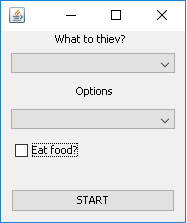
hi im back here again with another problem, so im doing a little thiever, my gui looks like this: alright so all my actual thieving code is ready, but the problem is in the comboboxes... So for example (if i choose index 1 from the first combobox, i want the options change in the combobox2)... if you didnt get it heres another example ( i have 3 different items in the upper combobox1, items are "pickpocket", "stalls", "chests"... if i choose "pickpocket on the upper combobox, i want to get these items to show up on combobox2 ("man", "dog", "guard")... this is my actionlistener code public String[] showoptionsforPickpocket = {"man", "woman", "xddd"}; public String[] showoptionsforStalls = {"cake stall", "stall number 2", "jfefofajfjeofjs stall"}; public String[] showoptionsforChest = {"ardy chest", "chestinmyass", "urmom"}; comboBox.addItemListener(new ItemListener() { public void itemStateChanged(ItemEvent arg0) { if (comboBox.getSelectedItem().equals("Pickpocket")) { JComboBox<String> comboBox_1 = new JComboBox<String>(showoptionsforPickpocket); comboBox_1.setBounds(10, 78, 164, 20); ScriptName.add(comboBox_1); } else if (comboBox.getSelectedItem().equals("Stalls")) { JComboBox<String> comboBox_1 = new JComboBox<String>(showoptionsforStalls); comboBox_1.setBounds(10, 78, 164, 20); ScriptName.add(comboBox_1); } else if (comboBox.getSelectedItem().equals("Chest")) { JComboBox<String> comboBox_1 = new JComboBox<String>(showoptionsforChest); comboBox_1.setBounds(10, 78, 164, 20); ScriptName.add(comboBox_1); } } }); right now im only listening to the combobox1, do i need another listener? and im trying to do this probs the hard way (just changing the strings in the combobox2) now if i load this up in osbot & ingame ... at start it doesnt show anything which its supposed to be, then i choose "pickpocket" it shows the stringsforpicckpocket... then after that ii choose any other option in combobox1 it doesnt change the strings in combobox2... how do i get this working
-
@FrostBug thanks alot!
-
i have a textfield... my string is this public String nameofloot = ""; now i can only type 1 item name (for example "Shark"), if i try to type "Shark, Rune platebody, Air rune", it takes that whole line as 1 item, how to seperate and make the script understand that if i put a "," between 2 words it means 2 different words? btnNewButton.addActionListener(e -> nameofloot = textField.getText()); //gets the text from food textfield part and thats how i get the text from the textfield to a string
-
ty so much you always helping us noobs out! much love
-
doesnt work, tried another post too and all my code here (GUI.JAVA)))))))) public class gui { public void run(main Main) { JFrame jFrame = new JFrame("joujouou"); jFrame.setSize(300, 500); jFrame.setResizable(false); JPanel settingsPanel = new JPanel(); TitledBorder leftBorder = BorderFactory.createTitledBorder("Settings"); leftBorder.setTitleJustification(TitledBorder.LEFT); settingsPanel.setBorder(leftBorder); settingsPanel.setLayout(null); settingsPanel.setBounds(5, 200, 280, 180); jFrame.add(settingsPanel); JPanel startPanel = new JPanel(); startPanel.setLayout(null); startPanel.setBounds(5, 350, 70, 20); jFrame.add(startPanel); JTextField txtnameOfNpc = new JTextField(); txtnameOfNpc.setHorizontalAlignment(SwingConstants.CENTER); txtnameOfNpc.setText("(name of npc to kill)"); txtnameOfNpc.setBounds(10, 11, 214, 20); settingsPanel.add(txtnameOfNpc); txtnameOfNpc.setColumns(10); txtnameOfNpc.addActionListener(e -> Main.hide = (String) txtnameOfNpc.getText().toString()); JButton startButton = new JButton("Start"); startButton.addActionListener(e -> { synchronized (Main.lock) { Main.lock.notify(); } jFrame.setVisible(false); }); startButton.setBounds(5, 390, 70, 20); startPanel.add(startButton); jFrame.setVisible(true); } } (MAIN.JAVAAAAAAAAAAAA) @ScriptManifest(author = "hh", info = "hh", name = "hh", version = 0, logo = "") public class main extends Script { Object lock = new Object(); private gui gui = new gui(); public String hide = ""; @Override public void onStart() { gui.run(this); } @Override public int onLoop() throws InterruptedException { return (random(50, 100)); } @Override public void onExit() { } @Override public void onPaint(Graphics2D g) { g.drawString(hide, 50, 50); <------------ TRYING TO PRINT IT OUT ON SCREEN (if this would work i would start writing aio killer ofc) } }
-
hi im noob and just learned how to make a GUI with eclipse window builder and move it into main.java (so theres no need for another .java file) current main.java code @ScriptManifest(author = "gay", info = "gay", name = "gay", version = 69, logo = "") public class Main extends Script { private JPanel ScriptName; public String chat; public void JFrame() { JFrame ScriptName; ScriptName = new JFrame(); ScriptName.setResizable(false); ScriptName.setTitle("AIO FIGHTER"); //your own title ScriptName.setBounds(100, 100, 250, 250); ScriptName.setDefaultCloseOperation(JFrame.EXIT_ON_CLOSE); ScriptName.getContentPane(); ScriptName.setLayout(null); //START BUTTON JButton btnNewButton = new JButton("START!"); btnNewButton.setBounds(10, 177, 214, 23); ScriptName.add(btnNewButton); ScriptName.getContentPane().add(btnNewButton); ScriptName.setVisible(true); //TEXTFIELD JTextField txtnameOfNpc = new JTextField(); txtnameOfNpc.setHorizontalAlignment(SwingConstants.CENTER); txtnameOfNpc.setText("(name of npc to kill)"); txtnameOfNpc.setBounds(10, 11, 214, 20); ScriptName.add(txtnameOfNpc); txtnameOfNpc.setColumns(10); ScriptName.getContentPane().add(btnNewButton); ScriptName.setVisible(true); //makes the button appearing when the script start txtnameOfNpc.addActionListener(e -> chat = (String) txtnameOfNpc.getSelectedText().toString()); } @Override public void onStart() { //log("Let's get started!"); JFrame(); } @Override public int onLoop() throws InterruptedException { return (random(50, 150)); } @Override public void onExit() { //log("Thanks for running my Tea Thiever!"); ScriptName.setVisible(false); } @Override public void onPaint(Graphics2D g) { ///hhhhhhhh nothing } } so now my problem is that i cant get the string "chat" to work for some reason, i tried some ActionListener things from the post below but couldnt get them to work either and i dont know whats wrong with this one txtnameOfNpc.addActionListener(e -> chat = (String) txtnameOfNpc.getSelectedText().toString()); ? help pls! ty!
-
yo how to do this with a textfield? cant get it to work for some reason tried something like this JTextField txtnameOfNpc = new JTextField(); txtnameOfNpc.setHorizontalAlignment(SwingConstants.CENTER); txtnameOfNpc.setText("(name of npc to kill)"); txtnameOfNpc.setBounds(10, 11, 214, 20); ScriptName.add(txtnameOfNpc); txtnameOfNpc.setColumns(10); txtnameOfNpc.addActionListener(e -> chat = (String) txtnameOfNpc.getSelectedText().toString()); then at graphics i tried to print the String chat to the screen, didnt work... then tried it the way you put it there txtnameOfNpc.addActionListener(new ActionListener() { public void actionPerformed(ActionEvent e) { ScriptName.setVisible(false); //disappear when clicking on the button ScriptName.dispose(); String chat = txtnameOfNpc.getSelectedText().toString(); //gets the selected item in the combo box log(chat); } });
-
Yo great gui tut bro but i dont think the lock works... i did everything like you did... and added the lock code to the main.java too but nope, when i choose something from the combobox = the string turns into the selected thing = script starts... Do i need to use the lock in the code (for example) right now im using if (hide == blackdhide) { tan the hides blah blah blah } do i need to check if the lock is on / off? and if so, how? Thanks!
-
ye ikr im a noob at coding but why doesn't this work? i drank abs all the way to 450, then ran the script for 1min didnt do anything if (getCurrentDrinkLevel() < 500) { inventory.interact("Drink", "Absorption potion(4)", "Absorption potion(3)", "Absorption potion(2)", "Absorption potion(1)"); }
-
thanks. i already knew this, i know the basics and i know how to use widgets (for example interacting with them etc etc.), BUT how can i use this snippet what i posted in my code? where do i put it? do i need to do something like if (getCurrentDrinkLevel > 100) ??? thats what i ment... or do i need to put my absorption level number between these " "'s in the snippet? *i tried something stupid like this: if (widget.getMessage().contains("970")) { inventory.interact("Drink", "Absorption potion(4)", "Absorption potion(3)", "Absorption potion(2)", "Absorption potion(1)"); }
-
how does this work? how can i get some number out of this: yes am a noobie, thanks! public int getCurrentDrinkLevel() { RS2Widget widget = getWidgets().get(202, 1, 9); if (widget != null && widget.isVisible() && widget.getMessage() != null) return Integer.parseInt(widget.getMessage().replace(",", "")); return 0; }
-
yes exactly what i was looking for thank you very much!
-
i noticed that the coordinates X n Y aren't stable when playing a minigame like pest control, i would like to make an area in the middle of these 4 towers https://imgur.com/a/O39tL4L i am making myself a pest control / killer / afker bot what would kill these enemies in that area? any help?
-
hey! just got back to osrs after a break n started to write a killing & looting script, i am killing some npcs in deep wilderness and i am scared of pkers... so if i am getting attacked by someone and the attacker is NOT an npc, can the bot send me a notification through windows or something...
-
ye bro all good, thanks
-
yes thanks for the help i already knew this, but as i said the client doesnt support this or then im doing something wrong... nothing happens when im in the interface RS2Widget makeall = getWidgets().getWidgetContainingText("Make-All"); makeall.interact("Make-All"); EDIT: yes im stupid this worked, RS2Widget m = getWidgets().get(446, 9); m.interact("Make-All"); Thanks love you boys
-
i need to interact with this interface... its hard for me! i'm a beginner! I want to make (for example: gold bars, rings, n stuff), but the bot doesn't support the "Make-All" option? https://imgur.com/a/Sm2lZ
-
just wanted to learn how to make a timer
-
yo so i need to make a timer what starts WHEN the script is started, after 10minutes = the script log outs & stops itself
-
okay! added them like this: https://ibb.co/ebdOx7 then got this: https://ibb.co/iJxDVS and in the actual .java file where my script is written i get this: https://ibb.co/mxXGH7 .......................................... why doesn't this interaction work? why is all this shittt needed RS2Widget smeltinterface = widgets.get(446, 1); smeltinterface.interact("Make-All");
-
hey thanks for your help BUT, i forgot to mention im a beginner, so what im asking is that is there a more simplier way to add this? im using this skeleton for my script " or is there a way to do this without adding any extra stuff? "
-
i looked up some posts but still couldnt get it to work case CRAFT: if (!smeltarea.contains(myPlayer().getPosition())) { getWalking().webWalk(smeltarea); } else { RS2Object Furnace = getObjects().closest("Furnace"); RS2Widget smeltinterface = widgets.get(446, 1); if (smeltinterface != null && smeltinterface.isVisible()) { smeltinterface.interact("Make-All"); } else { if (Furnace != null && Furnace.exists()) { Furnace.interact("Smelt"); } } } break; then i tried something like "RS2Object kek = widgets.getWidgetContainingText("Make-All")" then kek.interact("Make-All" etc etc doesnt work.... (IM TRYING TO SMELT GOLD BARS INTO GOLD RINGS IN AL-KHARID"



