Jack Shep
Members
-
Joined
-
Last visited
-
Putting a 5 second sleep before hopping seemed to do the trick, thanks!
-
I can't get getWorlds().hop() to work, here's some code: ladder = getObjects().closest("Ladder"); if (ladder != null) { if (ladder.interact("Climb")) { new ConditionalSleep(20000) { @Override public boolean condition() { return bankArea.contains(myPlayer()); } }.sleep(); } } if (bankArea.contains(myPlayer())) { log("Hop"); worldHop(328); } } public void worldHop(int world) { getWorlds().hop(world); } I've also tried ladder = getObjects().closest("Ladder"); if (ladder != null) { if (ladder.interact("Climb")) { new ConditionalSleep(20000) { @Override public boolean condition() { return bankArea.contains(myPlayer()); } }.sleep(); } } if (bankArea.contains(myPlayer())) { log("Hop"); getWorlds().hop(328) } I get the "Hop" message in the logger, but it doesn't hop. Any ideas?
-
I messed around with it some more and ended up figuring it out, thanks for your suggestions and help
-
Still getting the NPE even though the client is logged out, going to continue trouble shooting to try and figure out the issue. Any other ideas of what it might be?
-
I've tried a few things and still am getting the same results. Perhaps I don't fully understand what you're saying, either way, I don't know what else to try.
-
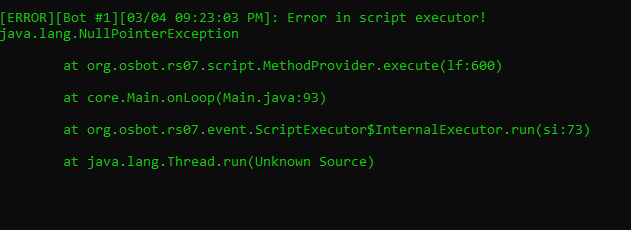
Hey all, I ran into some trouble trying to use Explv's login handler: Here's my onStart(): private LoginEvent loginEvent; @Override public void onStart() { loginEvent = new LoginEvent("username/email", "password"); getBot().addLoginListener(loginEvent); } Here's how I'm attempting to use the login handler in my onLoop(): if (getClient().getLoginStateValue() == 10) { loginEvent.execute(loginEvent); } All I'm getting in the logger when the bot should be logging in is this spammed over and over again. Unsure what I'm missing, any and all help is appreciated
-
Thank you for the help man, I've been struggling with this for a little while. I really appreciate it
-
That's the code the person who released the RSBuddyExchangePrice had on their post, I literally copied and pasted it, and it still didn't work. That's why I continue to have questions.
-
Thanks, I used their code to get the price for a dragon chainbody (like they do in their post) but the console output was: core.RSBuddyExchangePrice@7946e1f4 Any idea on what I'm doing wrong? This is the full code public static void main(String[] args) throws IOException { RSBuddyExchangeOracle.retrievePriceGuide(); // ... RSBuddyExchangePrice price; price = RSBuddyExchangeOracle.getItemByName("Dragon chainbody"); System.out.println(price); } I tried using the: getGrandExchange().getOverallPrice(int ID) method before and it didn't work. That's why I'm so confused.
-
I'm having some trouble understanding how to properly use this. I'm trying different things but they aren't working.
-
Is 30-80m daily considered low as far as gold farming goes?
-
I've looked over and have tried to use multiple peoples snippets on how to get the G.E/OSBuddy prices for items but nothing will work. I don't know if I'm doing something wrong or if the code I'm using is just out of date. Any help would be greatly appreciated.
-
It works! Thank you so much for your help
-
What I tried worked, my paint finally prints now, thank you for the help. But of course this generated another issue, now the script stops moments after I start it, although it sounds like an unrelated issue, the script worked 100% (besides for the paint) before I made the change. I tried parsing the strings in my onLoop() instead which fixed the new issues but again the constant re-parsing caused some issues. (So much lag that the script wouldn't run). Any Ideas?
-
The only issue with leaving the variables as 'string' is that I don't actually print those values. I use them in my formulas to calculate the values of the variables that I do actually print. So I need those variables as 'int's. However, what you're saying about re-parsing again and again makes sense. I only need to convert the variables from 'string' to 'int' once as they're just the OSBuddy prices of a few items. So I'll try parsing my strings to integers in my onStart() method and see if that fixes the issue.