kevinbeer
Members
-
Joined
-
Last visited
Everything posted by kevinbeer
-
But why would I want to buy proxies if the moment my account step out of the tutorial island it gets locked..
-
Oh I see... Thanks for the replies guys! I have one more question, it seems every day my proxies gets... "inactive" It is working fine for a day or 2 and after that if I try the proxy again it wont work anymore. How do you guys deal with this? Looking for 10 WORKING proxies is pretty time consuming to do every day as a daily task and increases the chances of getting caught!
-
Is there any other way to check if the client is using the proxy? I tried the Toggle Logger but nothing about it is listed on it... I just can't risk my main for it, if the client doesn't use the proxy without me knowing and end up getting my main chain banned...
-
-
How do you guys use the proxy? And how do I tell if its working? Because I don't feel like getting my main chainbanned
-
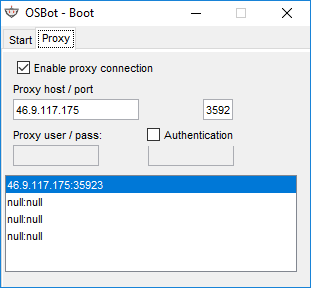
I have found a proxy socks 5 on a website and used it to try it out on the OSbot client. (See uploaded pic) However, how do I know if its working?