




Jump to content
View in the app

A better way to browse. Learn more.

OSBot :: 2007 OSRS Botting

A full-screen app on your home screen with push notifications, badges and more.

To install this app on iOS and iPadOS
  1. Tap the Share icon in Safari
  2. Scroll the menu and tap Add to Home Screen.
  3. Tap Add in the top-right corner.
To install this app on Android
  1. Tap the 3-dot menu (⋮) in the top-right corner of the browser.
  2. Tap Add to Home screen or Install app.
  3. Confirm by tapping Install.

Alext1996

Java Lifetime Sponsor
  • Joined

  • Last visited

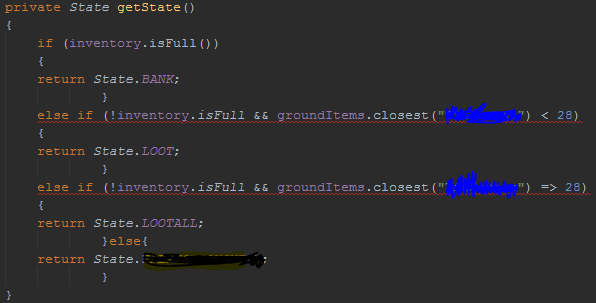
  1. Hello im having problem a little trouble with my script. I want it to be able to check the ground, if number of items on the ground currently are more than 28 or less than 28. if its less then 28 then im going to continue dropping items if its more than 28 then im going to pick them up but it says bad operander type I searched around and found no answer. I attached a screenshot of the problem below thanks alot merry christmas everyone!
Account

Navigation

Search

Configure browser push notifications

Chrome (Android)
  1. Tap the lock icon next to the address bar.
  2. Tap Permissions → Notifications.
  3. Adjust your preference.
Chrome (Desktop)
  1. Click the padlock icon in the address bar.
  2. Select Site settings.
  3. Find Notifications and adjust your preference.