Jump to content
View in the app

A better way to browse. Learn more.

OSBot :: 2007 OSRS Botting

A full-screen app on your home screen with push notifications, badges and more.

To install this app on iOS and iPadOS
  1. Tap the Share icon in Safari
  2. Scroll the menu and tap Add to Home Screen.
  3. Tap Add in the top-right corner.
To install this app on Android
  1. Tap the 3-dot menu (⋮) in the top-right corner of the browser.
  2. Tap Add to Home screen or Install app.
  3. Confirm by tapping Install.

deseo9

Members
  • Joined

  • Last visited

Everything posted by deseo9

  1. you want it ?
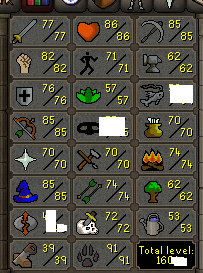
  2. it has void mage range d def b gloves m madnes 2 almost 200 qp
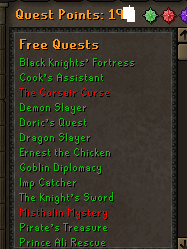
  3. i know all hes other nicknames and email on on ther forums
  4. <EVIDENCE HIDDEN>
  5. deseo9 replied to deseo9's topic in Archive
    belive me he will cry, i dont care about this 26m just ban him here
  6. deseo9 replied to deseo9's topic in Archive
    i got hes ip too
  7. deseo9 replied to deseo9's topic in Archive
    well i traded whit him before .... whitout scam
  8. deseo9 posted a topic in Archive
    https://osbot.org/forum/profile/245227-alldaybye/ he scammed me i have skype proof
  9. https://osbot.org/forum/profile/245227-alldaybye/ THIS GUY SCAMMER ME 26M OSRS I HAVE SKYPE PROOF
  10. sold to alldaybye
  11. please trusted
  12. still selliing
  13. 1$ 1m paypal
  14. buying bytecoins 1m 1 $
  15. use g2a for sell it lol this make no sence sell it for 12 when you can sell it for 20
  16. is so easy write to suport and get accout back after years if you wish
  17. i want sell 5m osrs for paypal
  18. use exchanger for example hitbtc.com or any other who accept paypal
  19. man is to late lol Total Supply 99,993,093,880 Circulating Supply 38,739,144,847 + MOST OF THEM ARE IN THE OWNER POCKET AND PRICE 1.8 $

Account

Navigation

Search

Configure browser push notifications

Chrome (Android)
  1. Tap the lock icon next to the address bar.
  2. Tap Permissions → Notifications.
  3. Adjust your preference.
Chrome (Desktop)
  1. Click the padlock icon in the address bar.
  2. Select Site settings.
  3. Find Notifications and adjust your preference.