






colleo7
Members
-
Joined
-
Last visited
Everything posted by colleo7
-
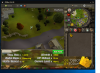
So this time it lasted nearly 2 hours, but gets stuck in this exact place. edit: the log says: Terminated! Exceeded attempt threshold Guessing it means cannot find the start point so it terminates itself. Hope this is some insight
-
Hey mate, It happens within an hour. i watch for a few runs, then let it be, come back an hour later and its been logged out due to inactivity. But yes, happens everytime within an hour id say. next to the maple tree and the tree icon on the mini map. Edit: I will run it again and watch over, and will try take a screen shot of exact point it stops at ( hopefully i get to it before it logs)
-
Amazing work on this script. I have however found one fault at the Seer's course. Ive tried it several times, and all within 1hour, it get stucks on the path way opposite the bank. with the camera view facing south ( towards where you run from ) and i think it cannot see the start point. I have camera zoomed out as suggested. Once again, amazing work!


