Jump to content
View in the app

A better way to browse. Learn more.

OSBot :: 2007 OSRS Botting

A full-screen app on your home screen with push notifications, badges and more.

To install this app on iOS and iPadOS
  1. Tap the Share icon in Safari
  2. Scroll the menu and tap Add to Home Screen.
  3. Tap Add in the top-right corner.
To install this app on Android
  1. Tap the 3-dot menu (⋮) in the top-right corner of the browser.
  2. Tap Add to Home screen or Install app.
  3. Confirm by tapping Install.

bbhh2

Members
  • Joined

  • Last visited

  1. bbhh2 replied to Shudsy's topic in Money Making
    Thanks for the quick push! But that shouldn't be the issue. I had over 1,000 food left. If that is the issue, maybe the bot isn't scrolling down far enough?
  2. bbhh2 replied to Shudsy's topic in Money Making
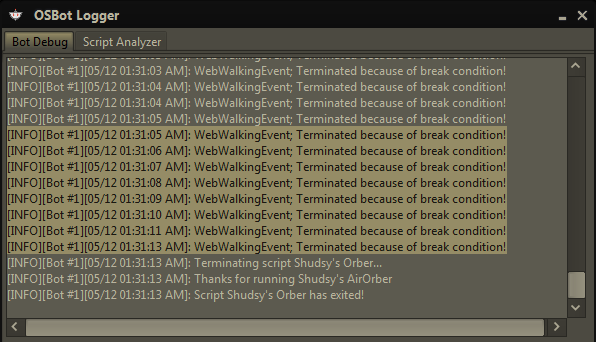
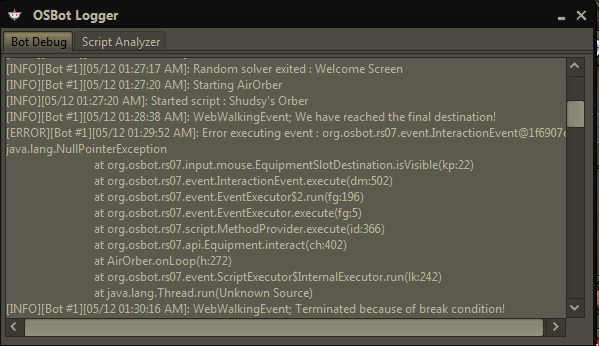
    Hi, I just purchased your script but I'm also having issues with the bot. It unfortunately did one inventory of orbs, then it just sits in the bank. It claims to be walking to the spot, but does not move at all. I'm attaching a screenshot of the log's beginning and end. It looks like a null pointer exception is causing the error. Ensure you're not looking for too many elements, that you're not looping through and beyond an array's size, et cetera. Please respond letting me know when you've fixed the issue. I'd really like to use my bot.
Account

Navigation

Search

Configure browser push notifications

Chrome (Android)
  1. Tap the lock icon next to the address bar.
  2. Tap Permissions → Notifications.
  3. Adjust your preference.
Chrome (Desktop)
  1. Click the padlock icon in the address bar.
  2. Select Site settings.
  3. Find Notifications and adjust your preference.