bakadomoko
Members
-
Joined
-
Last visited
Everything posted by bakadomoko
-
Thank you so much for your help, I finally managed to fix the problem! Sorry for the repeats, I literally just started coding today so a lot of things are confusing.
-
I changed the code to what you had: case COOKING: RS2Object stove = objects.closest("Range"); inventory.getItems()[2].interact("Use"); sleep(random(200,300)); stove.interact(); if(getDialogues().isPendingOption()){ RS2Widget troutWidget = getWidgets().getWidgetContainingText("Raw trout"); if(troutWidget != null) troutWidget.interact("Cook All");{ sleep(10000); } } And it keep selecting the first trout in my inventory, clicking on the stove, and repeats this again and again.
-
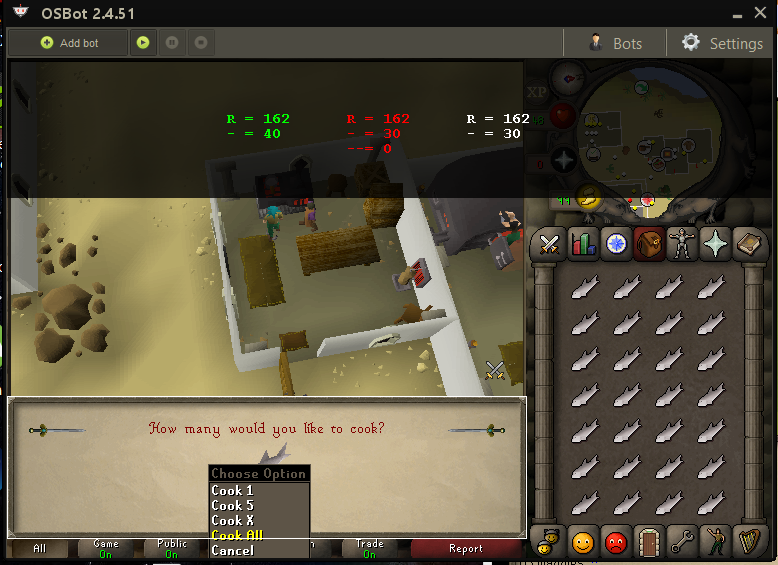
I'm not sure which number to use or how to format it: I got the values 307 and 162 from the first line in green: I would really appreciate if you could explain to me what a Widget and Widget child are so I can conceptually understand what the script is trying to do. Thanks so much!!
-
Hi guys, I recently started writing my own script that lets me cook things in Al Kharid. This is what I have so far: case COOKING: RS2Object stove = objects.closest("Range"); inventory.getItems()[2].interact("Use"); sleep(random(200,300)); stove.interact(); if(getDialogues().isPendingOption()){ RS2Widget range = getWidgets().get(307, 162); if(range.isVisible()){ range.interact("Cook all"); sleep(10000); I have no idea what Widgets are but I tried following this guy's advice: http://osbot.org/forum/topic/77995-how-to-right-click-select-cook-all/ I tried following his code but all this does is keep using my trout on the stove. When I use the item on the stove, the dialogue box changes and a picture of the food i'm trying to cook shows up. I need to right click the picture of the food in the dialogue box and then hit "Cook all". Thanks ahead of time for your help!!