






ishorty8
Members
-
Joined
-
Last visited
Everything posted by ishorty8
-
Thankyou! seems to be working now!
-
Of course I have your script in there, what kind of person would I be if I didn't nope still nothing, how about that, I can make a basic script that runs but I can't add a logo
-
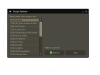
still the same, all im getting atm is this, I feel I'm probably doing something stupid o.O
-
hi new to scripting, I've been following loads of tuts ect and made a fisher that banks trout and salmon, but I was wondering how I would go about adding a logo to my script? @ScriptManifest(author = "iShorty8", info = "simple F2P fishing bot", name = "iFisher", version = 1.0, logo = "http://s22.postimg.org/f48fq388t/i_Fisher_logo_finished.png") after that I tried a similar method which I used to get my paint image, Image logo = getImage ("http://s22.postimg.org/f48fq388t/i_Fisher_logo_finished.png"); the logo doesn't show up though, any help would be greatly appreciated!


