Jump to content
View in the app

A better way to browse. Learn more.

OSBot :: 2007 OSRS Botting

A full-screen app on your home screen with push notifications, badges and more.

To install this app on iOS and iPadOS
  1. Tap the Share icon in Safari
  2. Scroll the menu and tap Add to Home Screen.
  3. Tap Add in the top-right corner.
To install this app on Android
  1. Tap the 3-dot menu (⋮) in the top-right corner of the browser.
  2. Tap Add to Home screen or Install app.
  3. Confirm by tapping Install.

Eluding_Fate

Members
  • Joined

  • Last visited

  1. That seems to have helped, though it's quite annoying as it also resizes everything else on my screen. Thanks for the help!
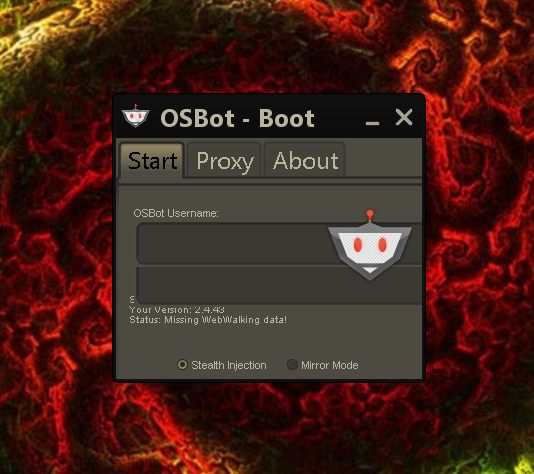
  2. As stated in the original post, I have already tried re-installing Java and adjusting the screen resolution. My Java version is up to date, and changing the screen resolution had no effect on the client.
  3. Hello. I downloaded the OSBot client, but when I attempt to open it the dialogue boxes overlap and I am unable to see the launch button. I have tried re-installing Java and adjusting my screen resolution but neither of them helped. I have attached a screenshot to help you guys see what I'm talking about. Does anyone have any ideas?

Account

Navigation

Search

Configure browser push notifications

Chrome (Android)
  1. Tap the lock icon next to the address bar.
  2. Tap Permissions → Notifications.
  3. Adjust your preference.
Chrome (Desktop)
  1. Click the padlock icon in the address bar.
  2. Select Site settings.
  3. Find Notifications and adjust your preference.