





DWrizzlez
Trade With Caution
-
Joined
-
Last visited
Everything posted by DWrizzlez
-
Bump
-
Once again. I said I am willing to use a forum mod middle man. Second I never stated I needed full payment. I quoted " I'm not going to give you full information of account/recovery test without receiving a single gp" never did I say I would go half and half. So thanks buddy (:
-
Bump
-
Bump 30M Bid @prorandy180
-
Bump
-
not a agser. But nice pure. Contact me on skype if interested (: DWrizzlez@hotmail.com
-
Bump
-
Bump
-
@Eliot Noted. Thanks (:
-
-
Bump
-
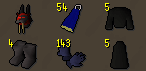
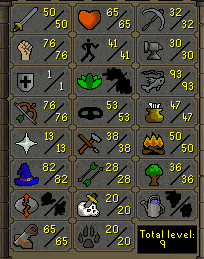
Selling my 58 Cmbt GMauler. Account has Spec Pool/mith gloves/desert treasure done. Account also has 93 fishing. 1. Pictures of the account stats 2. Pictures of the login details 3. Pictures of the total wealth (if there is any) 4. Pictures of the quests completed 5. The price you will be starting bids at 20m 6. The A/W (Auto-win) for your account 75m 7. The methods of payment you are accepting 07GP 8. Your trading conditions You first unless i deem trustworthy 9. Pictures of the account status 10. Original/previous owners AND Original Email Address Im OO. Login is throwaway email. If interested please contact me . Skype: DWrizzlez@hotmail.com Open to offers!

-
-
-
-
-
-
-
-
I have a 58 combat gmauler. 13 prayer quested. Has ancients and mith gloves. 50/77/1 77 range 82 mage. Has spec restore pool as well. Low hp . Also has 91 fishing if you care (: lemme know if interested (: Skype is DWrizzlez@hotmail.com
-
-
-
-
@Phaibooty Noted (: Thanks
-


