




Jump to content
View in the app

A better way to browse. Learn more.

OSBot :: 2007 OSRS Botting

A full-screen app on your home screen with push notifications, badges and more.

To install this app on iOS and iPadOS
  1. Tap the Share icon in Safari
  2. Scroll the menu and tap Add to Home Screen.
  3. Tap Add in the top-right corner.
To install this app on Android
  1. Tap the 3-dot menu (⋮) in the top-right corner of the browser.
  2. Tap Add to Home screen or Install app.
  3. Confirm by tapping Install.

cheifkeith69

Members
  • Joined

  • Last visited

  1. cheifkeith69 replied to Efpkaf's topic in Archive
    Ran the bot for like 14 hours straight, worked great
  2. cheifkeith69 replied to Efpkaf's topic in Archive
    Thanks for looking in to it, starting up the program again, will update later today if problem still occured or not. UPDATE: Been running over 3 hours strong so far, looks like it's fixed
  3. cheifkeith69 replied to Efpkaf's topic in Archive
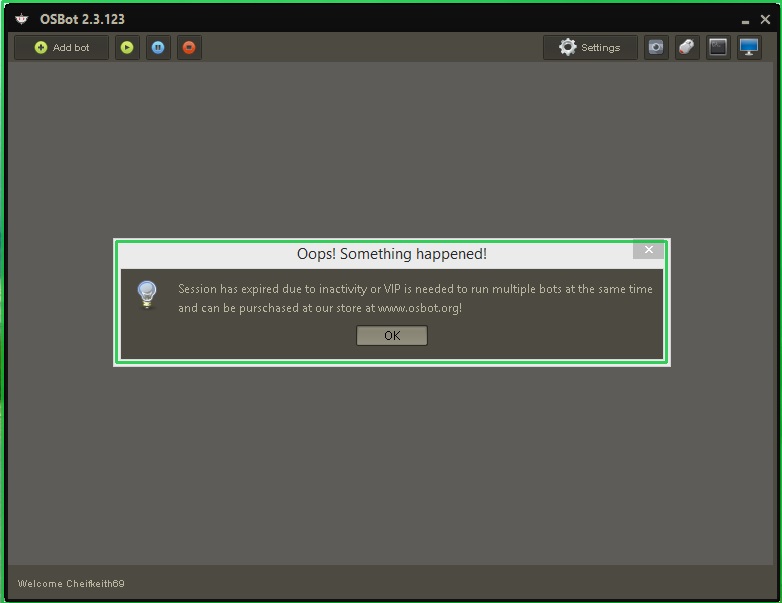
    Another update, still having this problem. Sometimes it'll run successfully, other days not so much. Today I can't run more than a few minutes without getting this:
  4. cheifkeith69 replied to Efpkaf's topic in Archive
    Bump I'm having the same problem... Every few minutes of running osbot, get that error saying it shut down from inactivity / need VIP for multiple bots. I've tried all of the above...... HELP! UPDATE: Seems to be working today.
Account

Navigation

Search

Configure browser push notifications

Chrome (Android)
  1. Tap the lock icon next to the address bar.
  2. Tap Permissions → Notifications.
  3. Adjust your preference.
Chrome (Desktop)
  1. Click the padlock icon in the address bar.
  2. Select Site settings.
  3. Find Notifications and adjust your preference.