




Jump to content
View in the app

A better way to browse. Learn more.

OSBot :: 2007 OSRS Botting

A full-screen app on your home screen with push notifications, badges and more.

To install this app on iOS and iPadOS
  1. Tap the Share icon in Safari
  2. Scroll the menu and tap Add to Home Screen.
  3. Tap Add in the top-right corner.
To install this app on Android
  1. Tap the 3-dot menu (⋮) in the top-right corner of the browser.
  2. Tap Add to Home screen or Install app.
  3. Confirm by tapping Install.

gilles537

Members
  • Joined

  • Last visited

  1. Just wanted it to be as human as possible, and the xp/h isn't affected that much. Thanks btw.
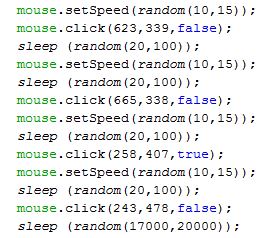
  2. Is there a method in the API for the bot to click on something in your inventory rather than just giving in mouse coördinates? Like a Use on something method? In case of no. Is there a way to randomize your mousclicks on that specific item? So yes, please give a bit of information. Thanks in advance This is what i'am using now
Account

Navigation

Search

Configure browser push notifications

Chrome (Android)
  1. Tap the lock icon next to the address bar.
  2. Tap Permissions → Notifications.
  3. Adjust your preference.
Chrome (Desktop)
  1. Click the padlock icon in the address bar.
  2. Select Site settings.
  3. Find Notifications and adjust your preference.