




Jump to content
View in the app

A better way to browse. Learn more.

OSBot :: 2007 OSRS Botting

A full-screen app on your home screen with push notifications, badges and more.

To install this app on iOS and iPadOS
  1. Tap the Share icon in Safari
  2. Scroll the menu and tap Add to Home Screen.
  3. Tap Add in the top-right corner.
To install this app on Android
  1. Tap the 3-dot menu (⋮) in the top-right corner of the browser.
  2. Tap Add to Home screen or Install app.
  3. Confirm by tapping Install.

New OSBot Git Account

This announcement is no longer active

Zach

01/26/17

If you need to create an OSBot Git Account, please create a topic in the SDN UPLOAD REQUEST FORUM with the following format:

YOUR APPLICATION WILL BE LOOKED AT - PLEASE BE PATIENT! DO NOT CONTACT DEVELOPERS OR STAFF REGARDING YOUR APPLICATION.

Title: [GIT REQUEST] <Your Name>

Information:

1) Do you already have a script ready for a release?

2) How many scripts do you plan on releasing within the next 3 months?

3) Do you plan on releasing primarily free or premium scripts?

4) How familiar are you with java programming?

5) Do you already have a PayPal account, if you choose to decide to make a premium account?

6) Have you read the guides outlining how to set-up your SDN script(s)?
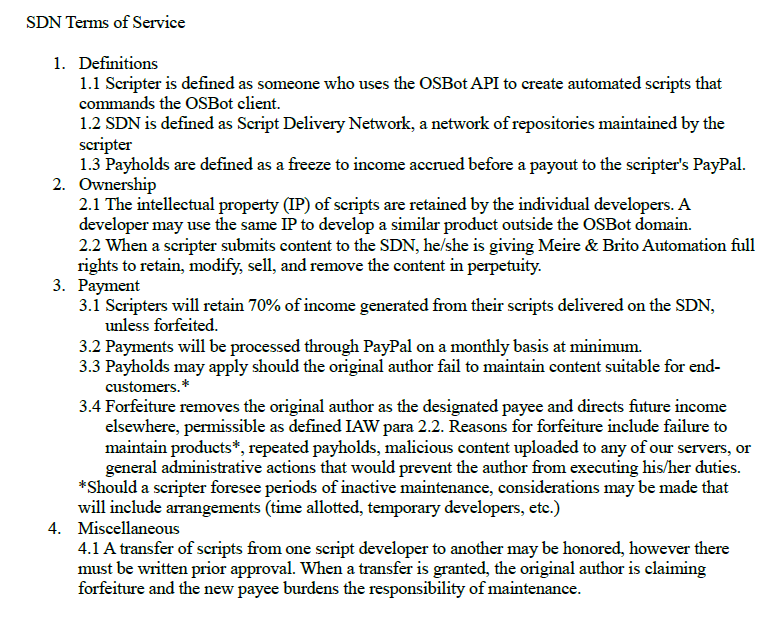
792b1e2daa182be5e7e2fa98a37fc316.png

If you agree to these terms and conditions, state “I agree with the SDN Terms of Service”.

When your request is processed/approved, it will be moved to the "Added Scripts" section.

Account

Navigation

Search

Configure browser push notifications

Chrome (Android)
  1. Tap the lock icon next to the address bar.
  2. Tap Permissions → Notifications.
  3. Adjust your preference.
Chrome (Desktop)
  1. Click the padlock icon in the address bar.
  2. Select Site settings.
  3. Find Notifications and adjust your preference.